
1. Quick Start
Note
As we continuously improve the software and expand its capabilities, the actual web interface may vary from what is described in this guide.
Description
Elecard CodecWorks Mux is a professional solution designed for real-time multimedia multiplexing, operating on a broad spectrum of hardware.
Installation
Ubuntu
sudo apt install ./Elecard-CodecWorks Mux*.deb
Managing
After installation, you can manage CodecWorks Mux in different ways:
Web interface
REST API
Web Interface
Note
The web interface can be accessed from all server-related network interfaces on port 8118. For example: 127.0.0.1:8118.
In order to launch a multiplexing task, you have to configure the multiplexing schema. It consists of 4 stages:
Physical inputs — automatically displays the system’s network interfaces that can be used to receive multicast streams. Each network interface can be assigned a list of multicast addresses for receiving streams.
Logical inputs — displays the multicast streams received from the first column and lets you work with them at the transport level.
Logical outputs — displays the user-configured streams.
Physical outputs — automatically displays the system’s network interfaces that can be used for multicasting. Each network interface can be assigned a list of multicast addresses for stream delivery.
After configuring the multiplexing schema click Save and confirm the action.
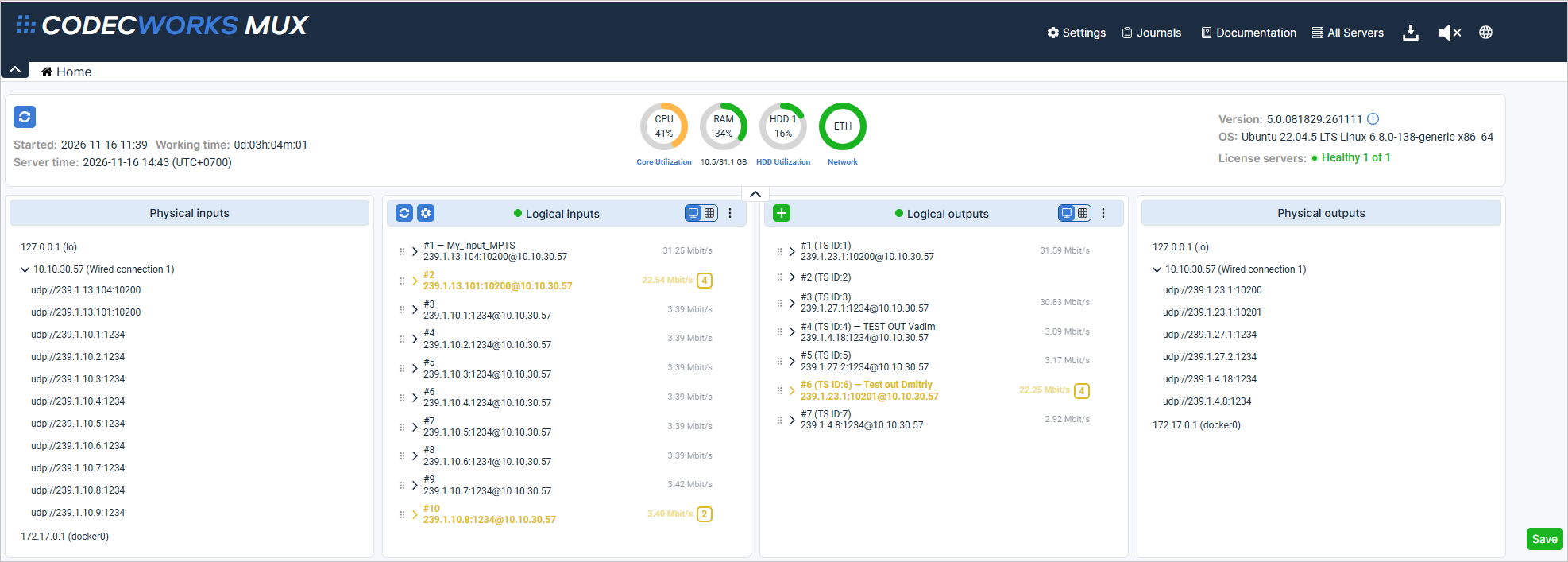
For a more detailed description on how to manage the multiplexing schema, refer to User Guide → Creating Multiplexing Services section.
REST API
Refer to the OpenAPI documentation here.
For more information contact the technical support team.